Two runners each run 40 km in a week. One jogs every kilometre; the other does intervals, a tempo run and a hard long run. Same distance, very different stress on the body. Training load is the number that captures that difference.
What training load means
Training load is a score for how much stress a run puts on your body, based on how long it lasted and how hard it was. Longer runs add more load. Harder runs add a lot more. Add up all your runs for a week and you get your weekly training load.
Once you know your load, you can answer the two questions every runner has: am I doing enough to improve, and am I doing so much that I will get hurt?
How training load is measured
Heart-rate load (TRIMP)
The most common method is TRIMP (training impulse), first described by sports scientist Eric Banister. Each minute counts more the higher your heart-rate zone. Windlace uses these weights per minute:
| Heart-rate zone | Load per minute |
|---|---|
| Zone 1 Recovery | 1.2 |
| Zone 2 Aerobic base | 1.9 |
| Zone 3 Tempo | 2.7 |
| Zone 4 Threshold | 3.6 |
| Zone 5 and above | 4.6 |
Worked examples
- Easy 60 minutes, all in Zone 2: 60 × 1.9 = 114.
- 45-minute tempo run: 30 minutes in Zone 2 (30 × 1.9 = 57) plus 15 minutes in Zone 4 (15 × 3.6 = 54) = 111. Shorter, but almost the same load as the hour.
- Recovery jog, 30 minutes in Zone 1: 30 × 1.2 = 36.
No heart rate? Use effort (session RPE)
Rate the whole run from 1 (very easy) to 10 (all out), then multiply by minutes. A 45-minute run at 7 out of 10 gives 315; a 60-minute easy run at 3 gives 180. The numbers are on a different scale, but the idea is the same.
Session load = minutes × effort (1 to 10)
Simple, free and surprisingly good. Use the same method every time so the weeks can be compared.
Acute vs chronic load: the key idea
Your body gets used to the load you normally do. Trouble comes from sudden jumps, not from high load in itself. That is why coaches compare two numbers:
Divide acute by chronic and you get the acute to chronic ratio. Research on athletes, notably by Tim Gabbett, found that injury risk tends to rise when this ratio climbs well above about 1.5.
| This week vs usual | Status | Example load | What it means |
|---|---|---|---|
| Below 0.8× | Low | under 320 | Less than usual. Fine for rest weeks. |
| 0.8× to 1.3× | Optimal | 320 to 520 | Good for getting fitter. |
| 1.3× to 1.5× | High | 520 to 600 | More than usual. Plan easy days. |
| Above 1.5× | Overtraining risk | over 600 | Much more than usual. Injury risk goes up. |
How to build up safely
- Know your usual week. Look at the average load (or kilometres) of your last 4 weeks.
- Stay in the optimal range most weeks: about 0.8 to 1.3 times your usual week.
- Raise it step by step. As your usual week grows, so does your optimal range. Small steps every week add up.
- Add a lighter week every 3 to 4 weeks. Drop to about 70 to 80% so your body can absorb the work.
- Come back slowly after a break. After illness or a holiday your usual week is lower, so the same old week is now a big jump.
Signs your load is too high
How to track your training load in Windlace
- Add your runs. Windlace works out each run's load from its second-by-second heart rate. Runs without heart rate count each minute as Zone 2.
- Open the Fitness tab. See this week's load (it resets every Monday) against your optimal range from your usual 4 weeks.
- Check the last 8 weeks. Each bar is coloured Low, Optimal, High or Overtraining risk, against that week's own range.
- See each run's load. Every run shows its load, coloured against an average run day in your optimal week.
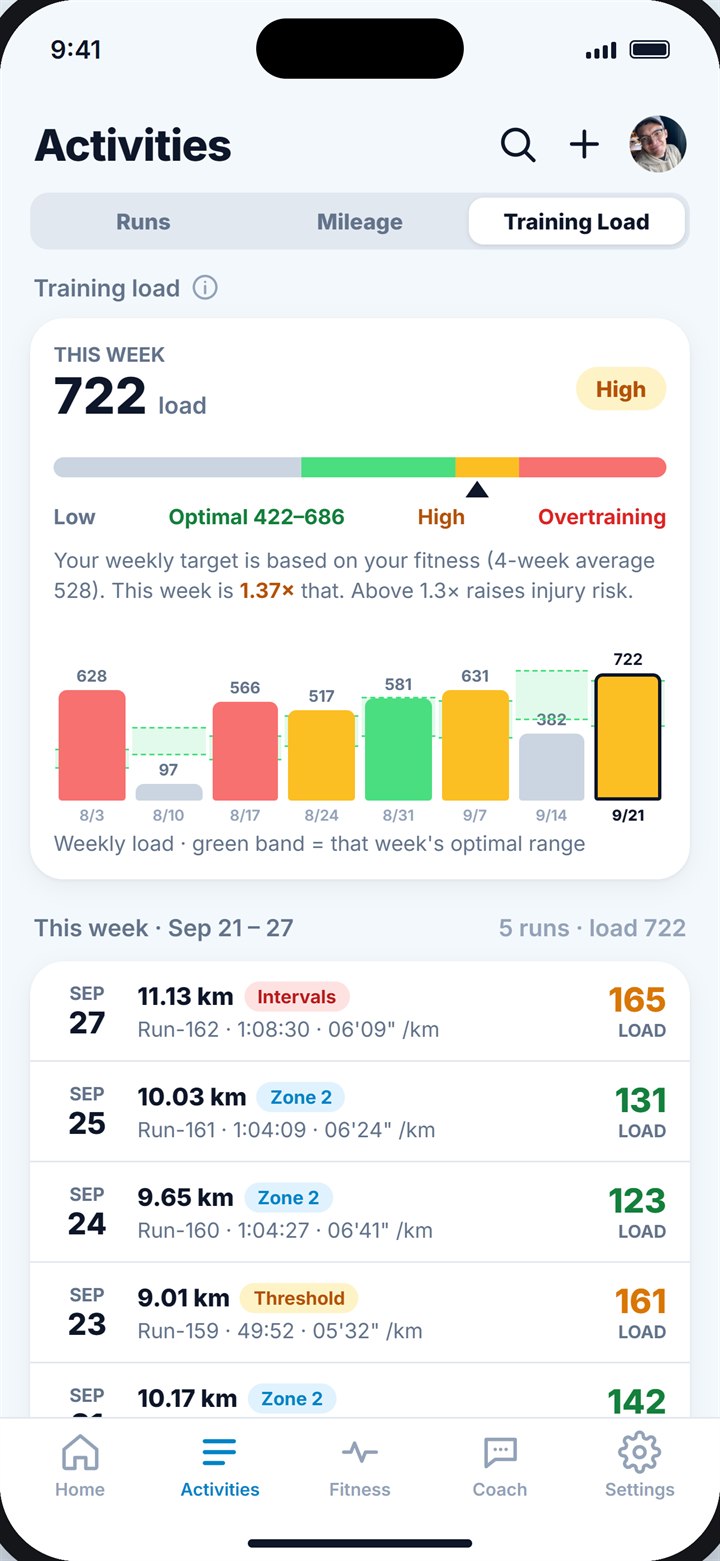
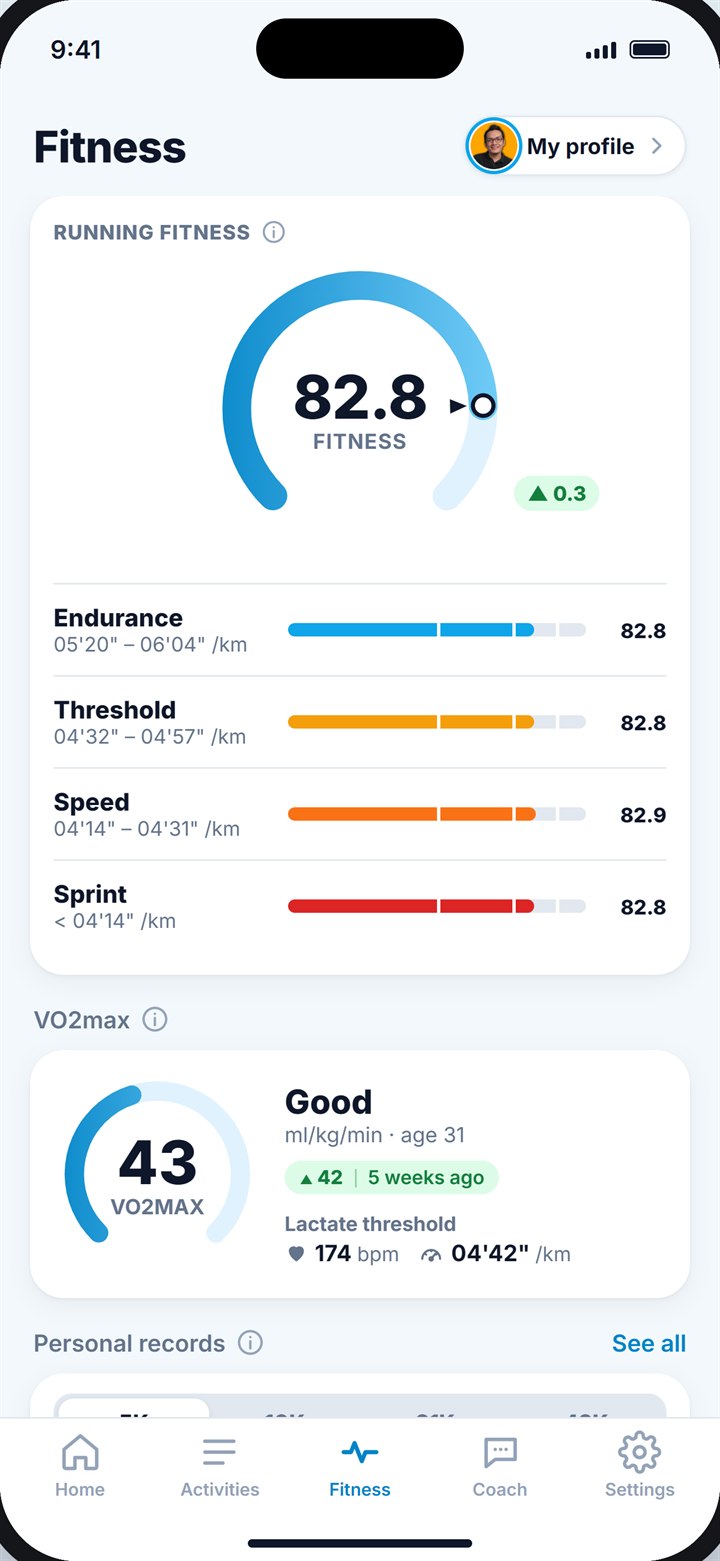
Weekly training load with your optimal range (left) and the Fitness tab (right).
Key takeaways
- Training load scores how much stress a run puts on your body, from its length and how hard it was.
- Heart-rate load (TRIMP) weights each minute by zone; without heart rate, use minutes × effort.
- Compare this week (acute) with your usual 4 weeks (chronic): sudden jumps cause most problems.
- Optimal is about 0.8 to 1.3 times your usual week; above 1.5 times, injury risk rises.
- Build step by step and take a lighter week every 3 to 4 weeks.
Frequently asked questions
What is a good training load?
There is no single good number. A good load is one inside your own optimal range, about 0.8 to 1.3 times your usual week, rising slowly over time.
Is training load the same as mileage?
No. Mileage counts distance only. Training load also counts how hard you ran, so 10 km of intervals adds much more than 10 km of easy jogging.
What is the acute to chronic workload ratio?
It is this week's load divided by your average week over the last 4 weeks. Around 0.8 to 1.3 is a good range; well above 1.5 is a big jump that raises injury risk.
How do I lower my training load?
Run fewer hard sessions, shorten your runs, or replace a run with rest or easy cross-training for a few days.
Does training load count strength training?
Running apps usually only count runs. If you lift or cycle a lot, keep that in mind when your running load looks low.

Keep reading
RacingFitness, fatigue and form: are you ready to race?The simple model coaches use to balance fitness and tiredness, and how to taper so you arrive at race day fit and fresh.10 min read
RecoveryHow long should you recover after a run?Typical recovery times after easy runs, hard sessions and races, the signs you need more rest, and how to recover faster.9 min read
 TrainingAerobic vs anaerobic training effectWhat the two 0 to 5 scores after a run mean, how they are worked out, and how to use them to balance your week.9 min read