When you start running, the phone you already own can track your distance, pace and route for free. As you get more serious, a running watch starts to look tempting. Do you need one? Not necessarily. Here is an honest comparison.
The short answer
A phone running app is enough for most beginners and casual runners; a GPS running watch is worth it if you want reliable heart rate data, run long distances, train with zones or intervals, or prefer not to carry a phone. Many runners use both: the watch records, and an app analyses.
Side-by-side comparison
| Phone app | GPS watch | |
|---|---|---|
| Cost | Free with your phone | Paid, from budget to premium |
| GPS distance | Good, especially in the open | Good to very good; multi-band models excel |
| Heart rate | Needs a chest strap or separate sensor | Wrist sensor built in; strap optional |
| Battery | Drains your phone on long runs | Many hours of GPS |
| Glanceable data | Need to pull out the phone or use audio cues | Pace and heart rate on your wrist |
| Extras | Music, maps, photos, calls | Cadence, HRV, sleep, training effect |
| Comfort | Pocket, belt or arm band | Light, on your wrist |
When a phone is enough
- You are new to running and want to see distance, pace and progress.
- You run 20 to 60 minutes a few times a week.
- You already carry your phone for music, safety or photos.
- You are not training by heart rate yet.
When a watch is worth it
- You want heart rate zones, for example to keep easy runs in Zone 2. See Heart rate zones for running.
- You run long: half marathons, marathons and long trail runs.
- You do structured workouts with intervals and laps.
- You want recovery data like resting heart rate, HRV and sleep.
- You prefer running light, without a phone bouncing around.
Accuracy: phone vs watch
For distance, a good watch is usually a little more accurate and more consistent than a phone, mainly because it sits on your wrist in the open and its GPS is tuned for running. Modern phones are very capable in open areas. For heart rate, wrist sensors are good for steady runs but can lag during fast intervals; a chest strap is the most accurate option for either. Read GPS accuracy for running for more.
Choosing a running watch
- GPS quality: multi-band or dual-frequency GPS helps in cities and forests.
- Battery: at least 15 to 20 hours of GPS if you plan marathons or trail runs.
- Heart rate: a decent wrist sensor and support for chest straps.
- Data export: make sure you can export your runs (as .fit files) or link them to other apps.
- Comfort and screen: easy to read in sunlight, comfortable all day.
Using both together
Many runners record with a watch and use a phone app for the bigger picture: weekly mileage, records, fitness trends and plans. Watch companies' own apps show plenty of data, but a separate running app can combine runs from different watches and phones in one history, and analyse them in its own way. Your runs move between them through account links or files.
Tips for running with your phone
- Use an arm band or a snug belt so the phone does not bounce.
- Turn on audio cues for each kilometre so you do not need to look.
- Allow location "always" or "while using" and turn off battery saver during runs.
- Wait for GPS before you start, in an open area.
The chest strap option
A chest strap measures heart rate from the electrical signal of your heart, so it is more accurate than a wrist sensor, especially in intervals, cold weather or for runners with tattoos or darker skin on the wrist, where optical sensors can struggle. Straps connect to most watches and many phones by Bluetooth. For runners who train by heart rate, a strap is often a better first purchase than an expensive watch upgrade.
Safety and running light
Many runners carry a phone anyway, for emergencies, payments or music. Some watches now include safety features such as incident detection or live tracking, and a few have mobile data. If you run alone, early or late, think about what you need to feel safe: that may decide the question for you.
Is a running watch worth the money?
If you run 3 or more times a week and want to train with heart rate or structured workouts, a mid-range GPS watch is one of the best running purchases you can make. If you run mostly for fun and fitness, your phone is enough, and the money is better spent on good running shoes. You can always start with your phone and buy a watch later; runs you recorded on your phone will still count.
Phone, watch or both: Windlace works with all of them
- Record with your phone on the Record tab: distance, pace, time and your route.
- Link a COROS watch so runs arrive on their own. Garmin, Polar, Suunto and Health Connect links are coming soon.
- Import from any watch with .fit, .tcx or .gpx files, or a COROS or Garmin export .zip.
- See it all in one place: zones, records, race predictions, training load and your fitness.
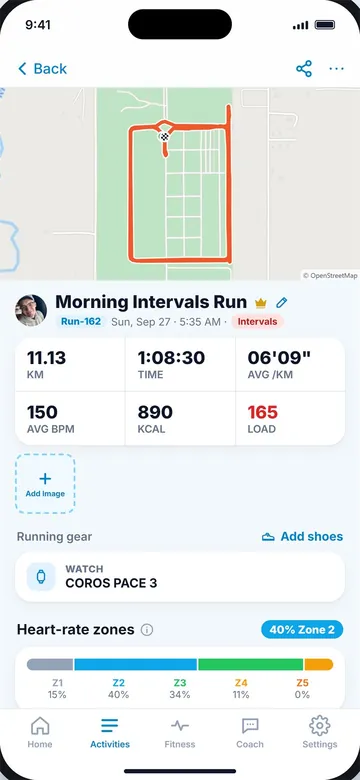
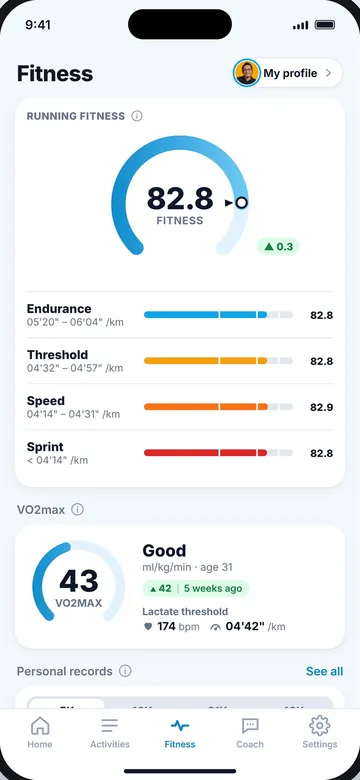
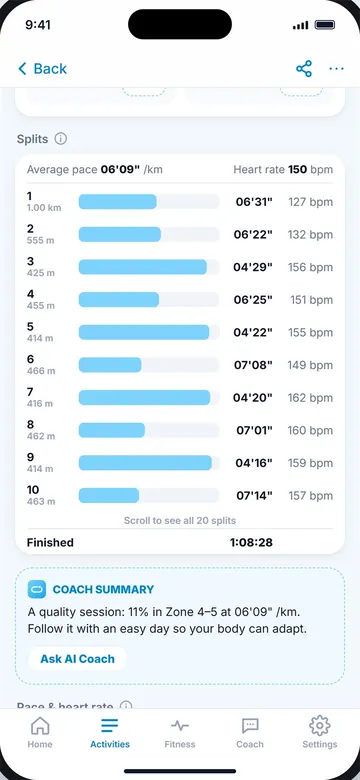
A run (left) and the Fitness tab (right).
Key takeaways
- A phone app is enough for most beginners and casual runners.
- A watch adds built-in heart rate, long battery life and data on your wrist.
- Good watches are usually slightly more accurate for distance than phones.
- Make sure you can export your runs as files, whatever you use.
- Many runners record with a watch and use an app to see the bigger picture.
Frequently asked questions
Do I need a running watch as a beginner?
No. A phone app is enough to track distance, pace and progress when you start.
Is a phone accurate enough for running?
Yes, in most areas. Modern phones are usually within a few percent in the open.
Can a phone measure heart rate while running?
Not on its own. You need a chest strap or other sensor connected to the phone.
Is a running watch worth it?
Yes, if you run 3+ times a week and want heart rate training, long battery life or structured workouts.
Can I use my watch and a running app together?
Yes. Many runners record with a watch and analyse runs in an app through account links or files.

Keep reading
DataGPS accuracy for running: why your distance is offHow GPS works, what causes distance errors, how accurate it really is and how to get better running tracks.9 min read
 Heart rateHeart rate zones explained, simplyWhat each zone does, three ways to calculate yours, and how much of your running belongs in each one.10 min read
BeginnersHow to start running: a simple beginner's guideRun-walk your first weeks, how often and how far to go, the right pace, what to wear and how to keep going.10 min read
Heart rateHeart rate zones explained, simplyWhat each zone does, three ways to calculate yours, and how much of your running belongs in each one.10 min read
BeginnersHow to start running: a simple beginner's guideRun-walk your first weeks, how often and how far to go, the right pace, what to wear and how to keep going.10 min read