Every runner has noticed it: the watch beeps for a kilometre well before the marker, or a race measures long. GPS is amazing technology, but it is not perfect. Understanding how it works helps you trust your data, and know when not to.
The short answer
Running GPS is usually accurate to within about 1 to 3% of the true distance in open areas, but tall buildings, dense trees, tunnels, tight turns and a poor first fix can add errors of 5% or more; race courses are measured on the shortest line, so watches also tend to read a little long in races.
How running GPS works
Your watch or phone listens to signals from satellites (GPS and often other systems like Galileo, GLONASS and BeiDou). By timing those signals, it works out where you are, usually once per second. It then joins these points together to draw your route and add up the distance. Each point has a small error, typically a few metres. Most of the time these errors cancel out; sometimes they add up.
What causes GPS errors
How accurate is it really?
| Where you run | Typical distance error |
|---|---|
| Open roads, parks, coast | About 1 to 2% |
| Suburbs with trees | About 2 to 3% |
| Dense forest, deep valleys | About 3 to 5% or more |
| City centre, tall buildings | Often 5% or more, with jumps |
| Running track | Often reads long or short on curves |
A 2% error over 10 km is 200 metres. That is enough to change your average pace by about 7 to 8 seconds per km.
Why races measure long on your watch
Official road races are measured along the shortest possible route a runner could take, cutting every corner (the "racing line"), and certified courses add a tiny safety margin so they are never short. Real runners weave around others, run wide on turns and cross the road to aid stations. Add normal GPS error, and most runners see 1 to 2% more distance than the course: 10.1 to 10.2 km in a 10K, 42.6 to 43 km in a marathon. Your official time over the official distance is what counts.
What GPS errors do to your pace and splits
Because pace is time divided by distance, a GPS jump can make one kilometre look impossibly fast and the next one slow. Short splits and instant pace are the most affected. That is why many runners use lap or kilometre averages rather than instant pace. Read What are running splits? for how to read them.
How to get better GPS tracks, step by step
- Wait for a good fix before starting: stand still in the open for 30 to 60 seconds after the watch says it is ready.
- Use multi-band or all-systems mode on your watch for races and city runs, if it has one.
- Keep the software up to date, including satellite data, which watches often download through their phone app.
- Wear it on the outside of your sleeve; for phones, use an arm band or a pocket close to the top of your body.
- Turn off power-saving GPS modes on phones while you run.
- On a track, use your watch's track mode if it has one, or count laps.
GPS errors and personal records
A bad GPS track can create fake records: a "fastest kilometre" from a jump that never happened. Good apps look for impossible stretches, like speeds no runner could reach or giant leaps between points, and warn you. It is then your choice whether to keep the run as it is, edit it or delete it.
Phone or watch: which is more accurate?
Good running watches usually beat phones slightly, because they are designed for it and sit on your wrist in the open. Modern phones can be very good too, especially in open areas. The bigger difference is often in heart rate and battery. Read Running app vs running watch for the full comparison.
How Windlace handles GPS errors
- Every run is checked for impossible stretches: speeds faster than about 7 m/s, stride lengths over 2.2 m, or jumps over 12 m/s between points.
- A run is flagged only when those stretches add more than 150 m and more than 2% of the distance.
- Your run is never changed. You see a warning and decide whether to keep it or delete it.
- See every split and the map on the run page, so you can spot where the GPS wandered.
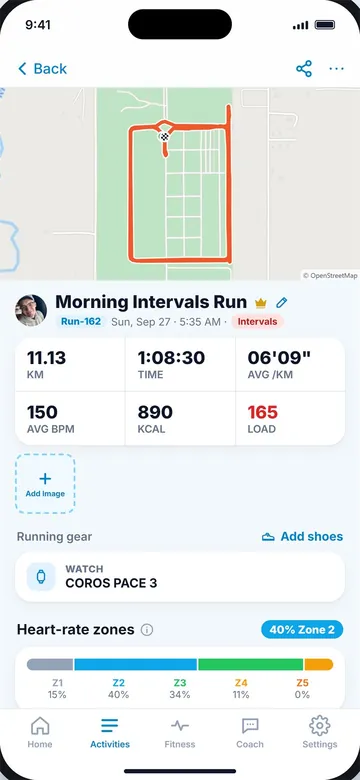
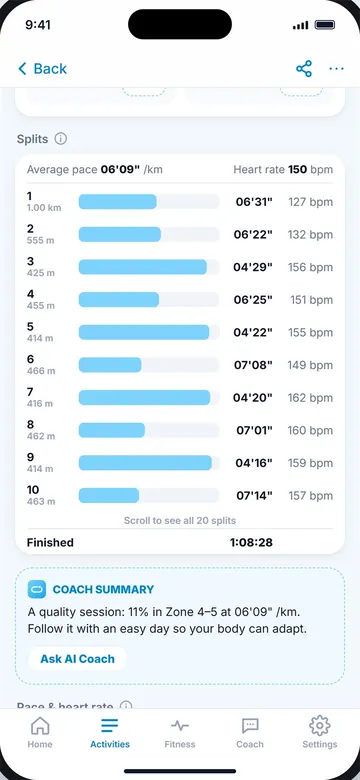
Run map (left) and splits (right).
Key takeaways
- Running GPS is usually within about 1 to 3% in open areas.
- Tall buildings, trees, tunnels and tight turns cause bigger errors and jumps.
- Races measure the shortest line, so watches typically read 1 to 2% long.
- Wait for a good fix, use multi-band mode if you have it and keep software updated.
- GPS jumps can create fake fast splits; good apps flag them without changing your run.
Frequently asked questions
Why does my watch show a longer distance than the race?
Races are measured on the shortest line. Weaving, wide turns and GPS error add 1 to 2% for most runners.
How accurate is GPS for running?
Usually within about 1 to 3% in open areas, less accurate near tall buildings or in dense forest.
Why is my GPS pace jumping around?
Each GPS point has a small error. Over short stretches this makes instant pace jumpy. Use lap or kilometre averages.
Is a phone or watch more accurate for running?
Good watches are usually slightly more accurate, but modern phones can be very good in open areas.
How do I get a better GPS signal?
Wait 30 to 60 seconds in the open before starting, use multi-band mode if available and keep your device updated.

Keep reading
PaceWhat are splits in running, and how do you read them?What splits and laps are, the three kinds of split, and how to read your own splits to pace better.9 min read
DataRunning app vs running watch: which do you need?How phone apps and GPS watches compare on GPS, heart rate, battery, cost and comfort, and how to use both.8 min read
 PaceWhat is a good running pace?Typical paces by level, how easy, tempo and race paces differ, and how to find the right pace for you.9 min read