After a run, your watch or app shows a list of rows: km 1, km 2, km 3, each with a time or pace. Those rows are your splits. They are one of the most useful things to look at after any run, and especially after a race, because they show exactly how you spent your energy.
What splits are
A split is the time (or pace) for one section of a run, usually each kilometre or mile, or each lap you mark by pressing the lap button. Together, your splits show how your pace changed from start to finish.
For easy runs, kilometre splits are perfect. For interval sessions, manual laps are better, because each rep and each recovery jog gets its own clean row.
The three kinds of split
| Split | What happens | How it usually feels |
|---|---|---|
| Positive split | Second half slower than the first | Great start, painful last third |
| Even split | Both halves about the same | Controlled, steady, hard at the end |
| Negative split | Second half faster than the first | Easy start, strong finish |
Most runners run positive splits in races, usually because they start too fast with fresh legs and adrenaline. Most world records over 5K and up have been run with very even or slightly negative splits. Learn how to do it in Negative split: the smartest way to race.
How to read your splits, step by step
- Look at the shape first. Are the splits getting slower, staying flat, or getting faster? That tells you the kind of split.
- Compare first half with second half. Add up the times, or compare average pace. A difference under about 1 to 2% is basically even.
- Check the slow ones against the route. A slow kilometre on a hill, at a water station or a sharp turn is not a pacing problem.
- Read heart rate next to pace. Pace dropping while heart rate rises means you were tiring. Pace and heart rate both dropping often means you eased off on purpose, or the route went downhill.
- Find the turning point. In a fading race, the split where pace starts to fall is where your start became too ambitious.
Example: reading a 10K race
Here are the splits of a runner aiming for 50 minutes who started too fast:
| Km | Pace | Heart rate | What it shows |
|---|---|---|---|
| 1 to 3 | 4:40 to 4:50 | 165 to 172 | Too fast for a 50-minute goal (5:00 pace) |
| 4 to 6 | 4:55 to 5:05 | 174 to 176 | Heart rate still climbing at goal pace |
| 7 to 9 | 5:15 to 5:20 | 177 to 178 | The fade: slower pace, higher heart rate |
| 10 | 5:10 | 182 | Final push |
Finish time: about 50:30. Run at an even 5:00 per km from the start, the same runner would probably have finished under 50 minutes and felt better doing it.
Reading interval splits
For an interval session like 6 × 800 m, good splits look boringly similar. If the first rep is 10 seconds faster than the last, the session was paced too hard at the start. A good target: all reps within about 2 to 3 seconds of each other, with the last one equal to or slightly faster than the first. Also check the recovery laps: if your heart rate barely comes down during the jog, take a little longer between reps.
Making a split plan for race day
A split plan is just a list of the times you want to see at certain points. It turns a big goal into small, checkable targets. Many runners write it on their wrist or a pace band.
- Start from your goal pace. 50:00 for 10K is 5:00 per km. Our pace conversion chart helps if your race is in miles.
- Make the first kilometre a little slower: 5:05 to 5:08 instead of 5:00.
- Write the running total at key points (for example 2 km, 5 km, 8 km), not every single split. Running totals are easier to check while tired.
- Allow for hills: plan slower splits on the climbs and faster ones on the descents.
After the race, compare your real splits with the plan. The gap tells you more than the finish time does.
How to use splits to improve
Common mistakes
- Judging by one split: GPS or a hill can make a single km look odd. Look at the pattern.
- Forgetting the course: a slow split up a long climb may be perfectly paced by effort.
- Banking time: running early splits faster "to save time for later" almost always costs more than it saves.
- Ignoring heart rate: pace alone does not tell you whether a slow split came from fatigue or from easing off.
How to read splits in Windlace
- Open any run. The Splits card shows your laps exactly as your watch recorded them, for example 400 m reps or 1 km laps.
- Each row shows the lap number, its distance, pace and heart rate, with a bar so the fast and slow laps stand out.
- No laps recorded? Windlace shows one row per kilometre (or mile, if you chose miles).
- Ask the AI coach about your splits: it can point out a fade or a strong finish and suggest a pacing plan for next time.
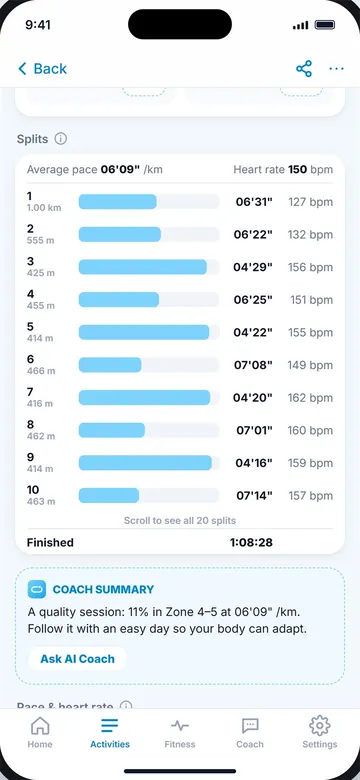
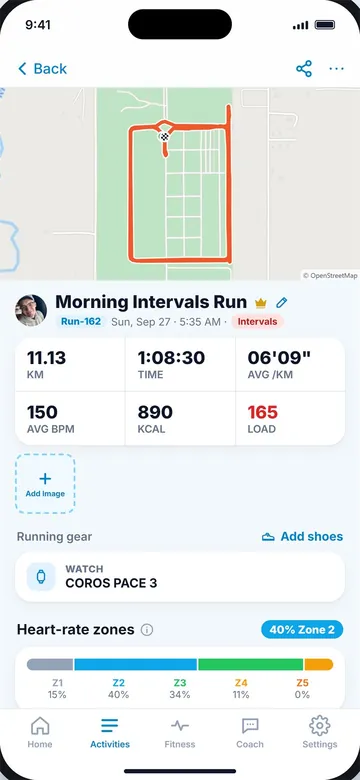
Splits with pace and heart rate (left) and the run summary (right).
Key takeaways
- A split is the time or pace for one section of a run: each km, mile or lap.
- Positive split = slower second half; even split = same pace; negative split = faster second half.
- Read the shape of your splits, compare halves, and check slow splits against hills and turns.
- Pace falling while heart rate rises is the classic sign of starting too fast.
- Plan even race splits and keep interval reps within a few seconds of each other.
Frequently asked questions
What does split mean in running?
A split is the time for one part of a run, such as each kilometre, mile or lap. Your splits together show how your pace changed during the run.
What is a good split time?
A good split matches your plan. In races, splits that are even or slightly faster in the second half usually lead to the best finish times.
What is the difference between a lap and a split?
They are often used to mean the same thing. Auto splits happen every km or mile; laps are usually sections you mark yourself with the lap button.
Why are my splits uneven on an easy run?
Hills, traffic lights, turns and GPS errors all change split times. On easy runs, uneven splits are normal and nothing to worry about.
Should I use km or mile splits?
Use the unit your race and plan use. Kilometre splits give more data points in a race, which makes pacing a little easier.

Keep reading
 RacingNegative split: the smartest way to raceWhy a faster second half wins races, how to plan negative splits for 5K to marathon, and how to practise them.9 min read
PacePace vs speed, and a min/km to min/mile chartThe difference between pace and speed, a conversion chart with km/h and mph, and easy formulas for any pace.8 min read
PaceWhat is a good running pace?Typical paces by level, how easy, tempo and race paces differ, and how to find the right pace for you.9 min read
RacingNegative split: the smartest way to raceWhy a faster second half wins races, how to plan negative splits for 5K to marathon, and how to practise them.9 min read
PacePace vs speed, and a min/km to min/mile chartThe difference between pace and speed, a conversion chart with km/h and mph, and easy formulas for any pace.8 min read
PaceWhat is a good running pace?Typical paces by level, how easy, tempo and race paces differ, and how to find the right pace for you.9 min read