When you export a run, move to a new app or back up your training, you will be asked to pick a format. FIT, GPX and TCX all hold a run, but they were designed for different jobs. Choosing the right one means keeping your heart rate, cadence and laps instead of just a line on a map.
The short answer
FIT is the best format for running data: it is the original file from most watches and keeps heart rate, cadence, laps, power and device details in a small file. TCX keeps most training data in a readable text format. GPX is mainly for routes and maps, and keeps heart rate and cadence only through extensions.
FIT: the original
FIT (Flexible and Interoperable Data Transfer) was created by Garmin and is now used by most sports watches, including COROS, Suunto, Wahoo and many others. It is a compact binary file, so you cannot read it in a text editor, but almost every running app can import it. When a site offers "Export Original", it usually means the FIT file straight from your watch.
- Keeps: GPS points, time, distance, heart rate, cadence, laps, power, temperature, device name and more.
- Best for: moving runs between apps, backups, detailed analysis.
TCX: training data as text
TCX (Training Center XML) was also created by Garmin, for its older Training Center software. It is a text file in XML, so it is readable and widely supported. It keeps laps, heart rate and cadence, but files are larger than FIT and some details (like power or device data) may be lost or stored in extensions.
- Keeps: GPS points, time, distance, heart rate, cadence, laps, calories.
- Best for: apps that do not accept FIT; workouts on treadmills without GPS.
GPX: the route format
GPX (GPS Exchange Format) is an open standard for GPS data used by hiking apps, mapping tools and route planners. A basic GPX file stores points with location, elevation and time. Heart rate and cadence can be added through "extensions", but not every app writes or reads them, and laps are not part of the standard.
- Keeps: route points, elevation, time; heart rate and cadence only via extensions.
- Best for: sharing routes, planning courses, loading routes onto watches.
Side by side
| FIT | TCX | GPX | |
|---|---|---|---|
| Type | Binary | Text (XML) | Text (XML) |
| Heart rate and cadence | Yes | Yes | Via extensions |
| Laps | Yes | Yes | No |
| File size | Small | Large | Medium |
| Works without GPS (treadmill) | Yes | Yes | Poorly |
| Best use | Full run data | Training data, wide support | Routes and maps |
Which format should you choose?
- Moving runs to another app: choose FIT (or "Export Original").
- FIT not accepted: choose TCX to keep heart rate and laps.
- Sharing a route or loading it on a watch: choose GPX.
- Backing up your history: keep the original FIT files.
How to open or check a file
GPX and TCX files open in any text editor, where you can see the points and values. FIT files need a program that understands them: most running apps, or free online FIT viewers. The easiest way to check a file is simply to import it into a running app and look at the run's map, heart rate and laps.
What about .zip and .gz files?
Sites often pack files to save space. Garmin's "Export Original" gives a .zip with the FIT file inside. Full account exports from Garmin, Strava and others are large .zip archives, sometimes with more .zip files or compressed .gz files inside. Some apps can read a .zip directly; for .gz files, unpack them first. See How to export activities from Garmin Connect and How to export your Strava data.
Example: moving to a new app
Sam has three years of runs on a watch and wants to try a new running app. Exporting each run as GPX would lose laps and might lose heart rate. Instead, Sam requests the full account export from the watch company, which contains the original FIT files, and imports them in one go. The new app shows every run with heart rate zones, cadence and laps, exactly as recorded, and Sam keeps the archive as a backup.
A little history
GPX appeared in the early 2000s as an open format for sharing GPS waypoints and tracks between devices. Garmin introduced TCX for its Training Center software, adding laps and heart rate, and later FIT as a compact format for its watches. FIT became the most common format across brands, and today it is the default "original" file for most running watches and bike computers.
Other things to know
- Re-exported files (not originals) may have smoothed GPS or fewer points.
- Elevation in GPX can come from GPS, a barometer or be added later from maps.
- Duplicate runs: importing the same run from two sources can double it; good apps detect this.
Files in Windlace
- Import runs as .fit, .tcx or .gpx files, many at once, or as a COROS or Garmin export .zip holding them.
- Runs you already have are skipped, so importing the same file twice does not double it.
- Export any run as .fit, .tcx or .gpx from the run's ⋯ menu.
- See all the data your file holds: map, splits, heart rate zones, cadence and laps.
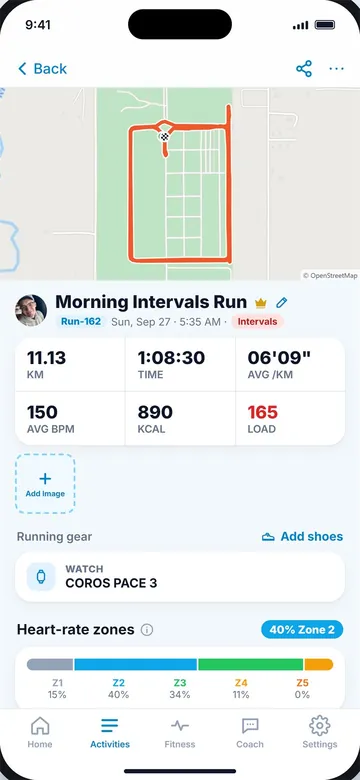
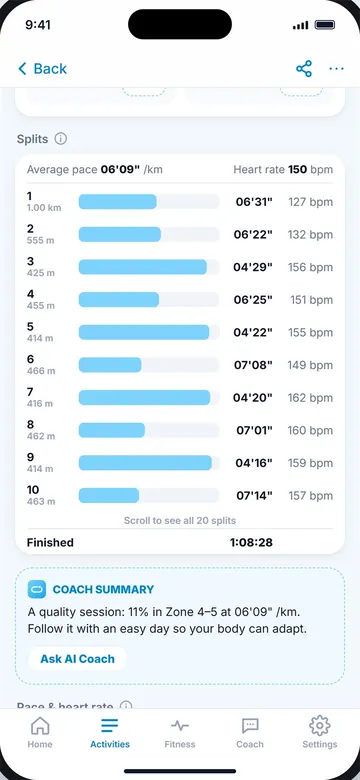
An imported run (left) with its zones and laps (right).
Key takeaways
- FIT is the original watch file and keeps the most data in a small file.
- TCX is a text format that keeps heart rate, cadence and laps.
- GPX is mainly for routes; heart rate and cadence need extensions and laps are missing.
- Use FIT (or Export Original) to move runs between apps.
- Unpack .gz files before importing; many apps read .zip files directly.
Frequently asked questions
What is a FIT file?
The original activity file from most sports watches. It stores GPS, heart rate, cadence, laps and more in a compact binary format.
Is GPX or TCX better for running?
TCX keeps laps, heart rate and cadence. GPX is mainly for routes. FIT is better than both for full data.
Does GPX include heart rate?
Only through extensions, which not every app writes or reads.
How do I open a FIT file?
Import it into a running app, or use a FIT viewer. It cannot be read in a text editor.
Which format should I use to back up my runs?
Keep the original FIT files. They hold the most data.

Keep reading
DataHow to export activities from Garmin ConnectExport one Garmin run as a FIT file, or your full history with Garmin's data export, and import it elsewhere.8 min read
DataHow to export your Strava dataExport one Strava activity or your full archive, what the files are and how to import them into another app.8 min read
DataGPS accuracy for running: why your distance is offHow GPS works, what causes distance errors, how accurate it really is and how to get better running tracks.9 min read